You log into your WordPress dashboard.
Everything is updated.
WordPress core is running the latest version. All your plugins are updated. Your theme is updated. You have a security plugin installed, and maybe Cloudflare is protecting your website too.
So you are safe from the latest PHP2Shell vulnerability, right?
Well, not necessarily.
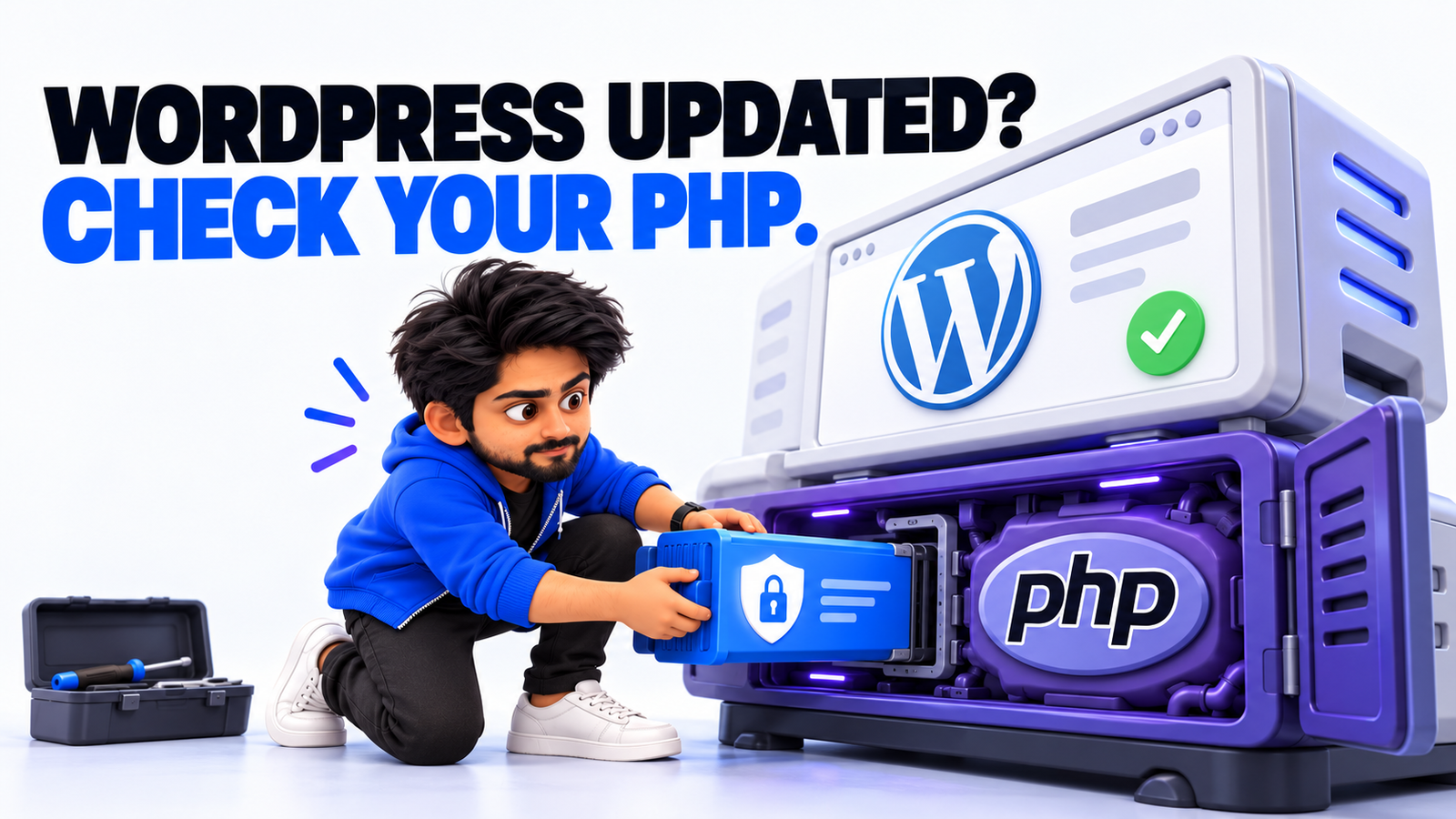
Because updating WordPress does not automatically update the PHP runtime running underneath it.
And that is exactly why the recent PHP2Shell security issue deserves attention from WordPress website owners.
On October 21, 2026, the PHP development team released emergency patches for two critical vulnerabilities that could allow attackers to execute code on vulnerable servers without authentication.
The vulnerabilities, collectively known as PHP2Shell, affect PHP itself.
So if you want to protect your WordPress website, you need to look beyond the usual dashboard updates.
Let me explain what actually needs to be checked.
1. First, Understand What You’re Updating
One of the most common misconceptions I see among website owners is that updating WordPress means the entire website environment is updated.
But a WordPress website has multiple layers.
For example:
- WordPress core: The content management system.
- Plugins and themes: Additional functionality and design.
- PHP: The programming language executing WordPress.
- Web server: Software such as Apache or Nginx that handles requests.
- Operating system and hosting infrastructure: The environment supporting everything else.
Each layer has its own update requirements.
Imagine updating Chrome while continuing to run an outdated operating system.
Updating the browser does not automatically patch vulnerabilities in the operating system.
The same principle applies here.
WordPress security updates are important, but they do not replace PHP security updates.
In fact, WordPress officially confirmed that no WordPress core update is required or planned specifically to resolve PHP2Shell.
The fix belongs in PHP.
2. Check Which PHP Version Your WordPress Website Uses
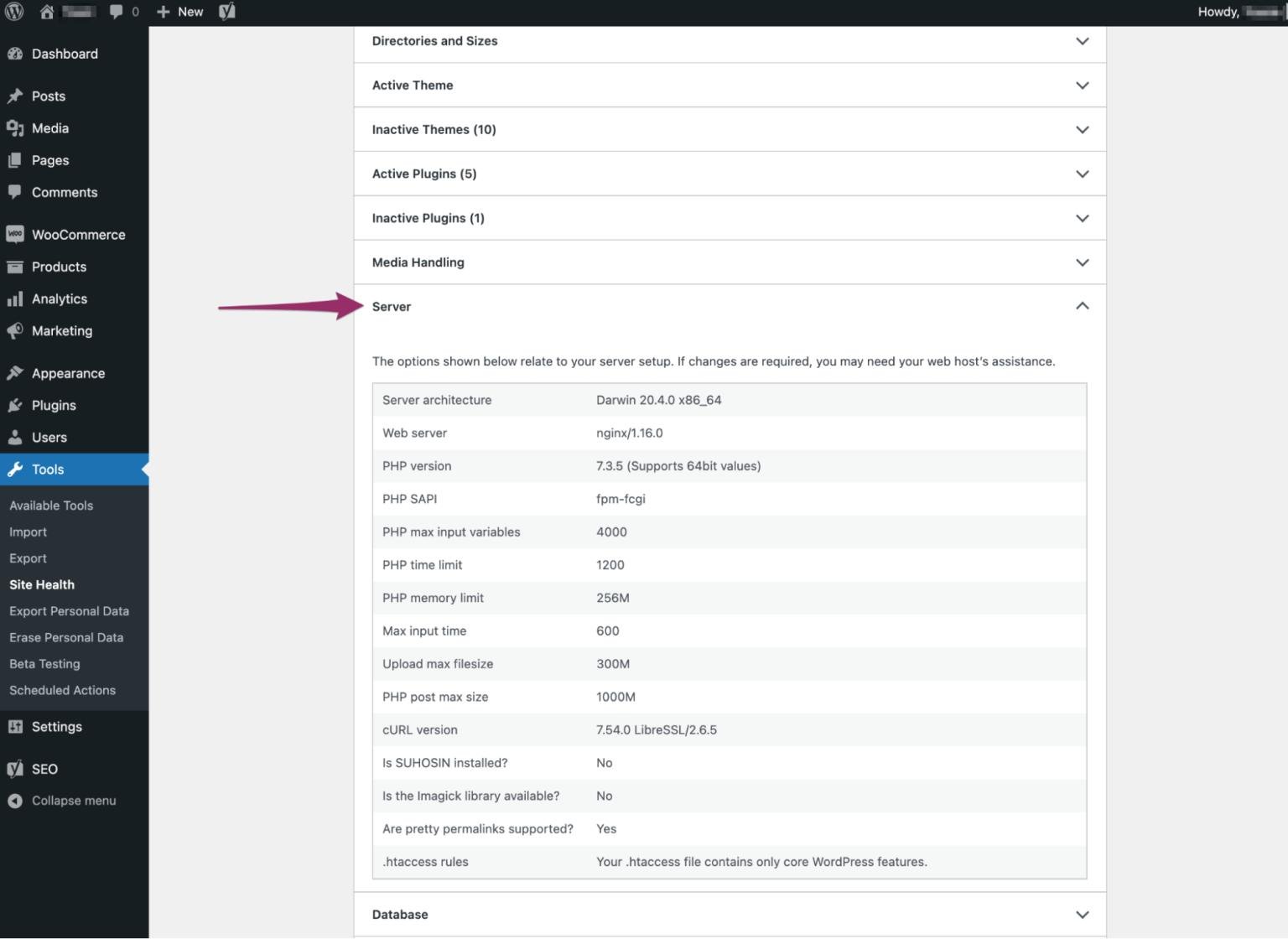
Before changing anything, check the PHP version currently running your website.
You can do this directly from WordPress.
- Log into your WordPress dashboard.
- Navigate to Tools → Site Health.
- Open the Info tab.
- Expand the Server section.
- Look for the PHP version.
You can also find PHP information inside your hosting control panel.
For example, cPanel-based hosting environments commonly provide PHP-related settings through MultiPHP Manager or other PHP management interfaces.
However, there is one important detail.
The version you see does not always tell you whether the hosting provider has installed a security backport.
Some providers maintain older PHP branches and apply security fixes without changing the main PHP version number.
So if your website is running an older version, do not automatically assume it is protected or vulnerable based on the version number alone.
Check the hosting provider’s security advisory and package details.
3. Which PHP Versions Fix PHP2Shell?
The official PHP project released four patched versions on October 21, 2026.
| PHP branch | Fixed version |
|---|---|
| PHP 8.5 | PHP 8.5.12 |
| PHP 8.4 | PHP 8.4.27 |
| PHP 8.3 | PHP 8.3.36 |
| PHP 8.2 | PHP 8.2.35 |
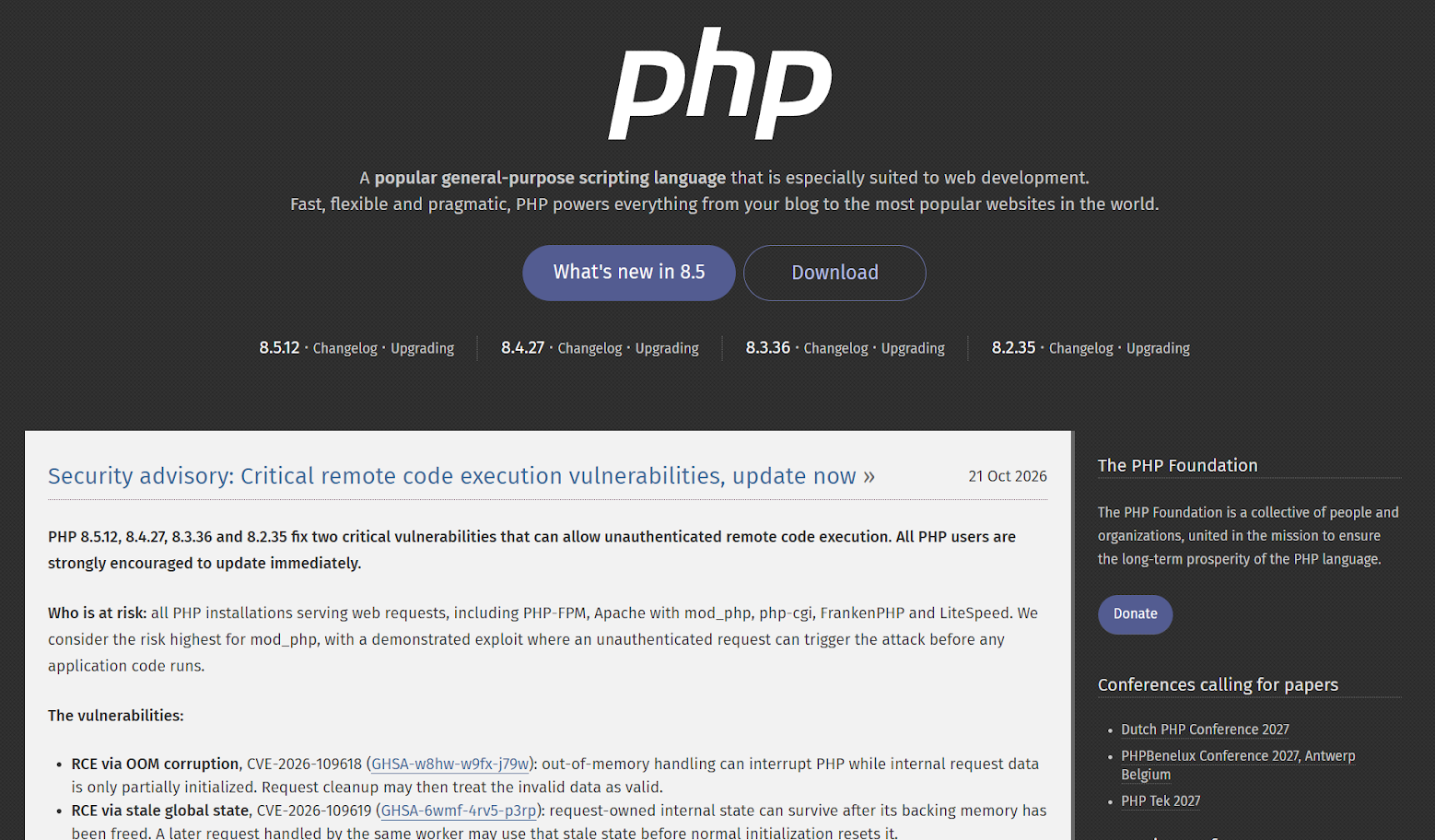
These releases address:
- CVE-2026-109618
- CVE-2026-109619
Both vulnerabilities received critical severity ratings.
If you are running an older release within one of these supported PHP branches, you should update to the relevant patched release.
PHP 8.1 and older branches no longer receive standard security releases from the PHP project.
Some hosting providers and Linux distributions have nevertheless released patched packages for older PHP versions.
For example, cPanel has published security updates for several older EasyApache PHP packages, while Ubuntu has provided security backports for supported distribution packages.
Personally, I would prefer moving a website to a supported PHP branch when its themes, plugins, and integrations are compatible.
That gives you a better long-term maintenance position.
But during an emergency, a verified vendor security backport can also be an appropriate fix.
4. How to Update PHP on a WordPress Website
The exact process depends on your hosting environment.
If You’re Using Shared Hosting or cPanel
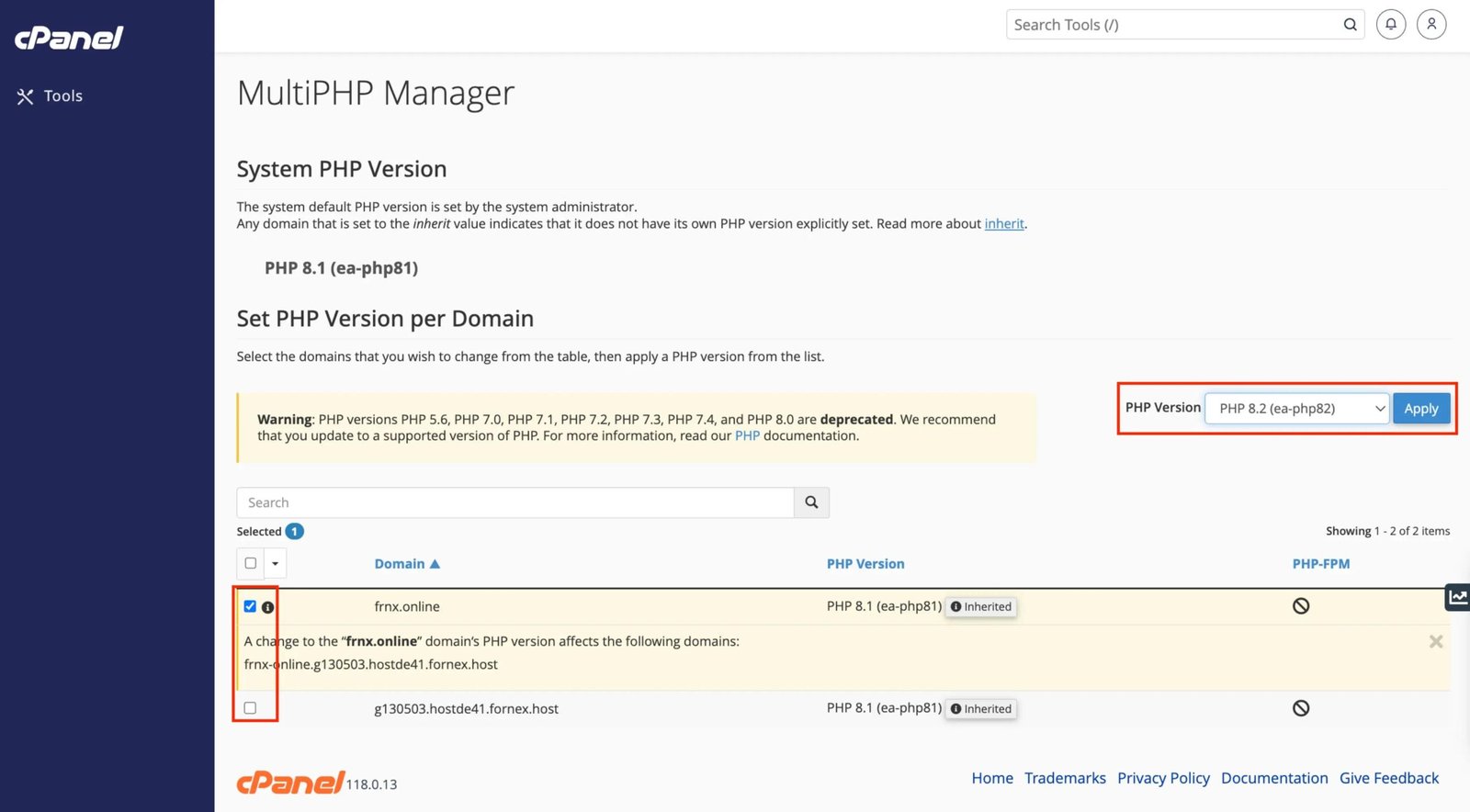
Start by checking your hosting provider’s security announcements.
If the provider manages PHP updates, they may already have deployed the patched packages.
In cPanel, you can typically inspect or select the PHP branch assigned to your website.
However, selecting a PHP version through MultiPHP Manager is not the same as installing security packages on the server.
Those packages are generally maintained by the hosting provider or server administrator through tools such as WHM and EasyApache.
If the necessary patched version is unavailable, contact your hosting provider.
Ask them to confirm whether both PHP2Shell vulnerabilities have been patched on the PHP runtime actually serving your website.
If You’re Using a VPS or Dedicated Server
You have more control, but you also have more responsibility.
First, identify which PHP packages and web-server configuration your website uses.
If you use Ubuntu’s official PHP packages, Canonical has published security updates for affected supported releases.
Its general update procedure includes:
sudo apt update
sudo apt upgrade
After updating, the relevant Apache or PHP-FPM services must be restarted so they load the patched binaries.
The exact service names and package commands depend on your operating system, PHP branch, and server configuration.
Do not blindly copy server commands without understanding your environment.
And remember that running php -v over SSH may show the command-line PHP version, which can differ from the PHP runtime serving your actual website.
Verify the web-facing PHP environment separately.
If You’re Using Managed WordPress Hosting
Some managed hosting companies handle PHP security updates automatically.
For example, WordPress.com confirmed on October 21 that websites hosted on its platform were protected against the disclosed PHP vulnerabilities.
However, that does not mean every hosting company follows the same update process.
Check your provider’s specific announcement.
If you cannot find one, ask for written confirmation.
5. Don’t Update PHP Without Checking Website Compatibility
Now, I want to make something clear.
I’m absolutely recommending that website owners apply the relevant security patches urgently.
But that does not mean randomly switching a production website to a newer PHP major or minor branch without checking compatibility.
Over the years, I have seen WordPress websites become difficult to maintain because of outdated plugins, unsupported integrations, and custom code that nobody wants to touch.
Changing the PHP branch can expose those compatibility problems.
Here is the process I would follow.
- Take a backup. Make sure you have a recent, restorable backup of the website files and database.
- Check compatibility. Review the requirements of important plugins, themes, and custom integrations.
- Apply the security update. Prefer the patched release of your existing supported PHP branch where possible.
- Restart the relevant services. Confirm PHP workers are actually using the updated runtime.
- Test important functionality. Check forms, login, checkout, API integrations, scheduled tasks, and the WordPress administration area.
- Monitor errors. Review PHP and web-server logs after the update.
Security patching should happen urgently, but that does not mean compatibility testing is unnecessary.
This is also why I prefer building websites that are easier to maintain in the first place. I explained my approach in How I Build a WordPress Website That Is Easy to Maintain.
6. Can Cloudflare Protect Your Website Without a PHP Update?
This is another question I’ve seen people discussing.
Cloudflare deployed Web Application Firewall (WAF) protections against PHP2Shell before the public disclosure.
These protections are available to customers using Cloudflare’s WAF, including the Free plan.
That is genuinely useful.
A WAF can identify and block suspicious requests before they reach your website.
But here is the important part.
Cloudflare itself says website administrators should still install the PHP patches.
Why?
Because firewall rules are an additional security layer. They do not repair the vulnerable code inside PHP.
Attack techniques can change. New variations may be discovered. And requests that bypass the configured protection could still reach the origin server.
So I would treat Cloudflare as additional protection, not as an excuse to postpone security updates.
7. What If You Cannot Patch PHP Immediately?
Sometimes a website depends on outdated functionality, the hosting provider has not released an update, or the administrator simply does not have the required access.
In that situation, the official PHP security advisory provides several temporary configuration mitigations.
These include:
- Disabling
session.upload_progress.enabled. - Disabling
fatal_error_backtraceson PHP 8.5. - Restricting request body sizes and upload limits.
- Reviewing PHP memory-limit behavior and server-level memory controls.
However, these settings address particular exploitation paths.
They are not complete fixes.
One suggested temporary mitigation for the out-of-memory vulnerability involves setting memory_limit=-1 under appropriate administrative controls.
But removing PHP’s per-request memory limit can introduce resource-exhaustion risks. It should only be considered with suitable infrastructure controls and an understanding of the trade-offs.
I would not recommend changing these settings casually through a hosting panel.
If you manage a highly sensitive website and cannot safely patch or isolate the affected environment, temporarily restricting public access may be necessary.
The PHP project and cybersecurity agencies make it clear that installing the appropriate security update is the reliable solution.
8. How Do You Know Whether Your Website Was Already Compromised?
This is where I would be careful about making assumptions.
Just because your website was running a vulnerable PHP version does not mean somebody successfully attacked it.
At the same time, simply installing the patch does not automatically remove malware if an attacker had already compromised the website.
For websites with possible exposure, administrators should review relevant security information.
Some areas worth investigating include:
- Unexpected PHP or web-server errors.
- Suspicious requests around the disclosure period.
- Unknown PHP files or web shells in website directories.
- Newly created administrator accounts.
- Unfamiliar scheduled tasks or cron jobs.
- Unexpected outgoing connections or processes launched by the web-server account.
- Changes to configuration files or application code.
These are investigation clues, not proof that PHP2Shell was used.
And the absence of obvious errors does not guarantee that exploitation never occurred.
If you find genuine signs of compromise, isolate the affected environment, preserve the relevant evidence, and investigate before restoring normal access.
For websites handling sensitive customer information, this deserves particular attention.
9. What About Headless WordPress Websites?
This is one area I want to highlight because more developers are combining WordPress with modern frontend frameworks.
Imagine a website built with Next.js.
The frontend is deployed on a platform such as Vercel, while WordPress handles content management through a separate server.
The Next.js frontend itself does not require PHP.
But the WordPress backend still does.
And if that backend is running an affected PHP version, it needs the relevant security update.
Having a modern JavaScript frontend does not automatically protect the PHP content-management environment behind it.
The same applies to other hybrid architectures.
Security needs to cover every component, including systems that visitors may never interact with directly.
Frequently Asked Questions
Does updating WordPress fix PHP2Shell?
No. PHP2Shell vulnerabilities exist in the PHP runtime. Updating WordPress core, plugins, or themes does not directly patch PHP.
Should I update to PHP 8.5 immediately?
Not necessarily. You need a version containing the relevant security fixes. A patched release of your existing supported PHP branch may be sufficient, or you can use a verified vendor security backport.
Is PHP 8.1 automatically vulnerable?
PHP 8.1 is no longer supported through the PHP project’s standard releases. However, some distributions and hosting vendors provide security-patched PHP 8.1 packages. Verify the specific vendor build.
Can a WordPress security plugin prevent PHP2Shell?
A security plugin may add useful protections, but it does not replace a PHP runtime patch. The vulnerability exists below the WordPress application layer.
Do I need to restart the server after updating PHP?
You need to ensure affected PHP processes load the patched binaries. Depending on your setup, this may require restarting Apache, PHP-FPM, containers, or other relevant services. Your managed host may handle this automatically.
Final Thoughts
I have always believed that maintaining a website is just as important as building it.
A beautiful design means very little if the underlying infrastructure is outdated or insecure.
And I think PHP2Shell is a good example of why website owners should pay attention to the technology running behind their websites.
You do not need to panic.
You do need to verify your hosting environment, apply the relevant patches, and make sure the updated PHP runtime is actually being used.
And if someone tells you that everything is safe simply because WordPress is updated, ask one more question.
What about PHP?