If you manage Shopify stores regularly, you probably noticed it almost immediately.
You log into the Shopify admin and suddenly everything feels slightly unfamiliar.
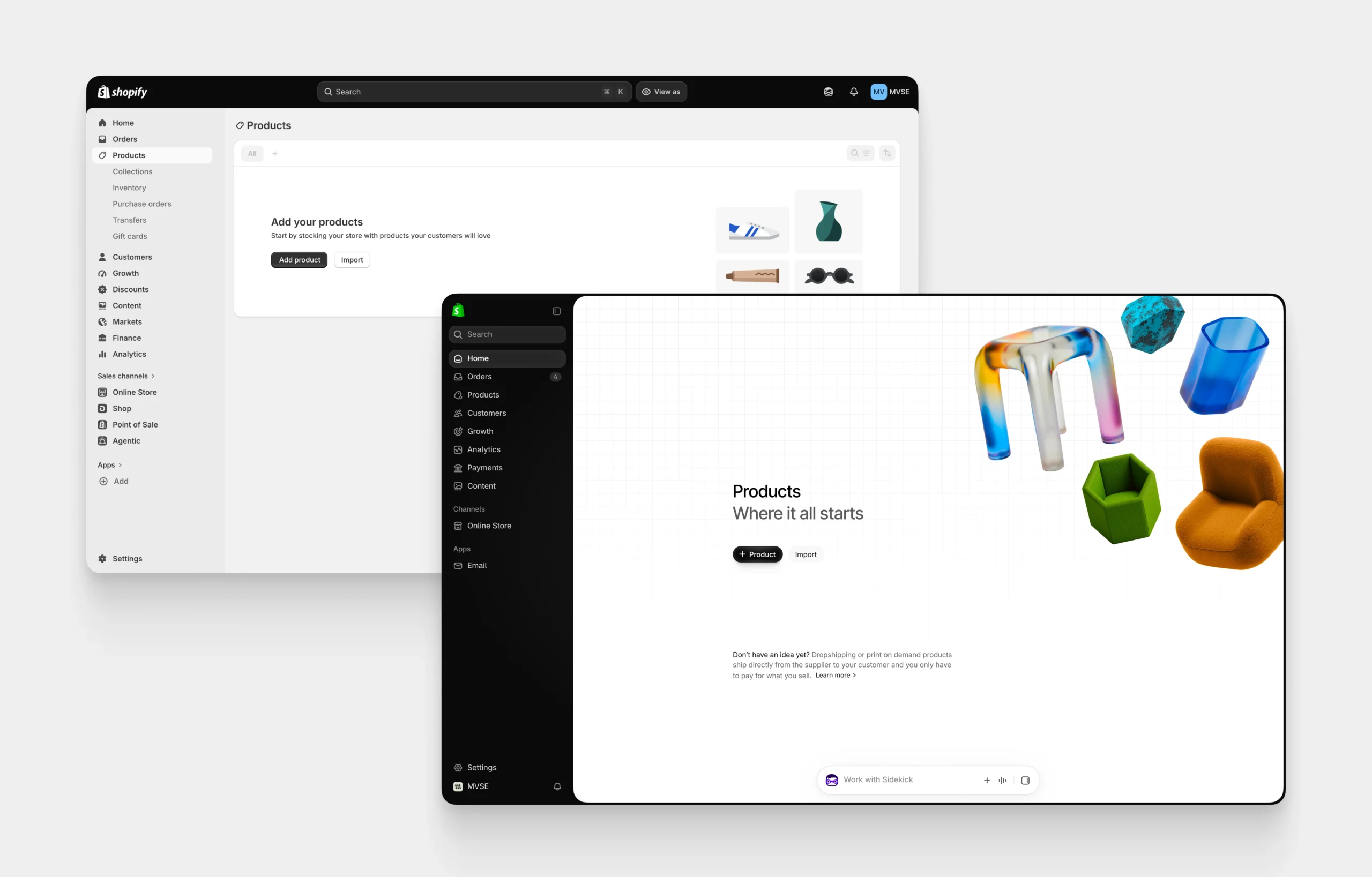
The sidebar is dark.
The top navigation looks different.
Search has moved.
Spacing has changed.
Icons look different.
And Sidekick is now sitting at the bottom of almost every page waiting for you to talk to it.
Shopify officially started rolling out this refreshed admin design on September 15, 2026, and the rollout is happening gradually across stores. There is nothing merchants need to install or enable. It simply appears when Shopify enables it for your store.
I work inside Shopify quite regularly, so this kind of update is interesting to me for a different reason.
I am not only looking at whether it looks nicer.
I am looking at whether it actually makes managing a store easier.
And I think that is where this redesign becomes much more interesting.
What Actually Changed in the New Shopify Admin?
Shopify describes the update as a new visual system across essentially the entire admin.
That includes:
- New colours
- Updated typography
- Different spacing
- New icons
- A redesigned application frame
- Collapsible navigation
- Search moved into the sidebar
- Notifications moved into the sidebar
- The store switcher moved into the sidebar
- Sidekick becoming a floating interface at the bottom of pages
Shopify says the goal was to create a more focused and consistent interface while giving merchants more working space.
And visually, you can definitely see that.
The old admin felt like a traditional SaaS dashboard.
The new one feels more like Shopify is trying to turn the entire admin into one connected workspace.
But visually changing software that people use every single day is never quite as simple as making it look cleaner.
The Sidebar Is Probably the First Thing You Will Notice
The biggest visual difference for me is definitely the navigation.
Shopify has moved search, notifications and the store selector from the top of the interface into the left navigation.
The sidebar can now collapse into a much smaller icon-based navigation when you want more space for whatever you are working on.
From a pure interface-design perspective, I understand the decision.
It gives the actual page more room.
It keeps navigation inside one predictable area.
And it removes a lot of things from the top of the screen.
But there is another side to this.
People who manage Shopify stores every day have built years of muscle memory around where things live.
When you move something that somebody clicks 20, 50 or 100 times every day, even a very small interface change can initially feel like a huge productivity problem.
This is something I think software companies sometimes underestimate.
Consistency itself is a UX feature.
Search Has Moved, But the Keyboard Shortcut Still Works
Search now lives inside the sidebar instead of prominently across the top of the admin.
The good news is that the keyboard shortcut still works.
You can use Ctrl + K on Windows or Command + K on Mac to search your Shopify admin. Shopify’s search can find things such as orders, products, apps and other resources, and results can be filtered by category.
If you work inside Shopify every day, I would actually start using this shortcut more often.
Once navigation keeps changing, keyboard search becomes one of the easiest ways to avoid hunting through menus.
Sidekick Is Now Almost Impossible to Ignore
This is probably the bigger story behind the redesign.
Shopify Sidekick used to feel more like an AI feature sitting inside Shopify.
Now it increasingly feels like Shopify wants Sidekick to become part of the interface itself.
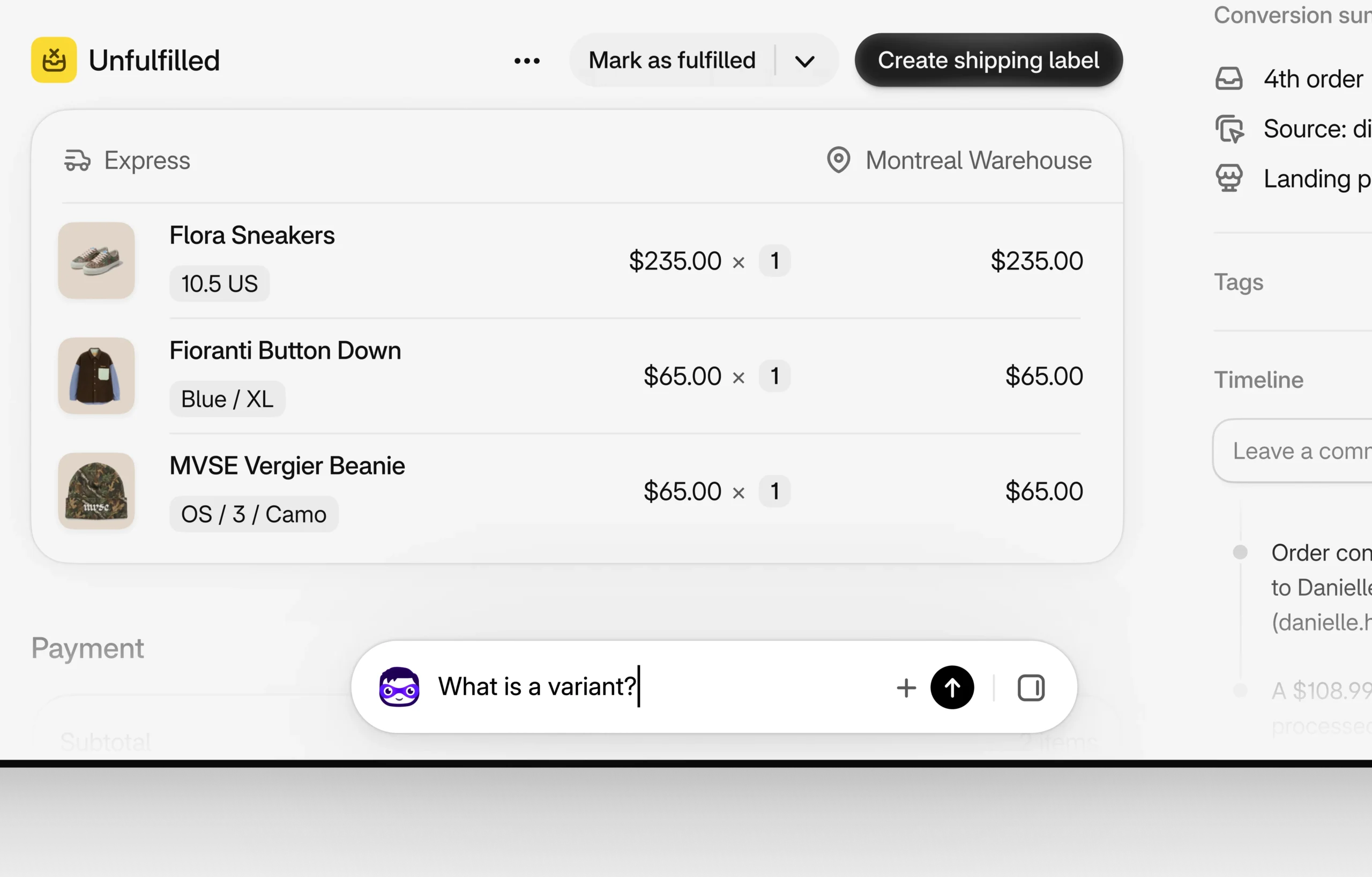
In the refreshed admin, Sidekick appears as a floating chat at the bottom of pages.
For quick questions, you can work directly from that floating interface.
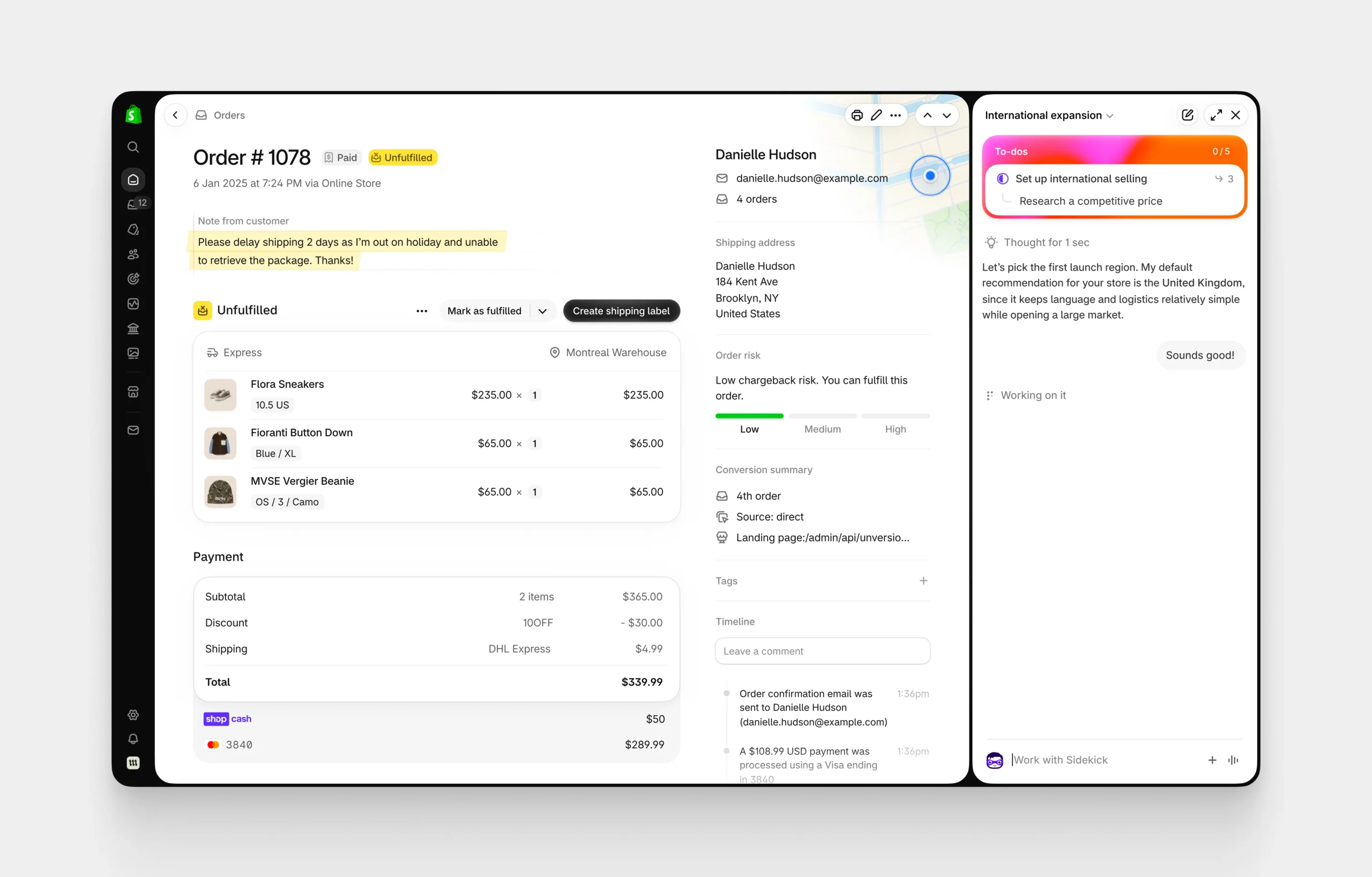
For larger tasks, Sidekick can expand into a bigger panel beside whatever you are already working on.
Shopify says daily Sidekick sessions increased 4.8 times between 2025 and 2026, which helps explain why the company is giving it much more permanent screen space. That figure comes directly from Shopify, so I would treat it as a company-reported usage metric rather than an independent measurement.
And this did not begin with the September redesign either.
Earlier in 2026, Shopify had already started making Sidekick much more central to Shopify Home through features such as Sidekick Pulse, which analyzes store information and surfaces recommended actions.
So I do not think the floating Sidekick interface is just a design decision.
It gives us a pretty good idea of where Shopify believes store administration is going.
Shopify Is Slowly Moving From Clicking to Asking
This is probably the part of the update I find most interesting.
For years, managing an ecommerce store basically meant finding the right page, opening the right setting, changing something and saving it.
Now Shopify is slowly introducing another layer.
Instead of finding information manually, you can ask Sidekick.
Instead of navigating through several reports, you can ask it questions about store data.
Instead of filling certain things manually, Sidekick can help complete tasks.
And because Sidekick understands which admin page you are currently viewing, Shopify can give the AI contextual information about what you are working on.
I don’t think buttons, menus and dashboards are disappearing anytime soon.
But I do think Shopify is clearly preparing for a future where a meaningful amount of store management happens through natural-language instructions.
The new interface seems designed around that future.
Shopify Also Flattened the Interface
Another interesting design principle Shopify talks about is what it calls de-layering.
Over time, admin interfaces naturally accumulate panels inside panels, cards inside cards, borders, containers and multiple visual levels.
Shopify says it intentionally removed some of these layers and allowed page structure itself to separate information.
This explains why parts of the new interface feel much flatter and more open.
Personally, I like this idea in principle.
Modern admin dashboards can become ridiculously container-heavy.
Everything does not need its own white card with a shadow and border.
But there is a balance.
Removing visual containers makes an interface cleaner.
Removing too much visual separation can make information harder to scan.
And based on early merchant feedback, that seems to be one of the areas creating some friction.
Merchants Are Definitely Not Completely Happy
This is where things get interesting.
The Reddit thread you shared is overwhelmingly negative about the redesign.
People specifically complained about the dark sidebar, changes to navigation, additional clicking, keyboard navigation, visual hierarchy and Sidekick taking up permanent space.
There are similar discussions in Shopify’s own community.
Some merchants have complained that certain status colours are harder to distinguish quickly, while others have asked for the ability to change or hide the dark sidebar and floating Sidekick interface.
Another very recent Reddit discussion has hundreds of votes and contains similar criticism, although there are also people saying they like the visual design or that it simply needs time to become familiar.
I think that last part is important.
Reddit threads are not representative surveys of every Shopify merchant.
People who are frustrated with an update are naturally more likely to create a post about it than people who opened Shopify and thought, “Yeah, this looks fine.”
So I would not conclude that everybody hates the new Shopify admin.
But there is clearly enough repeated feedback around navigation, contrast, additional clicks and Sidekick placement that I would not dismiss the criticism either.
I Think the Real Problem Is Muscle Memory
For me, the biggest issue with redesigning something like Shopify Admin is not whether the previous interface looked better.
It is muscle memory.
Shopify Admin is operational software.
People are fulfilling orders.
Checking payments.
Changing inventory.
Editing products.
Managing discounts.
Updating collections.
Checking analytics.
Processing returns.
Some teams spend practically their entire working day inside it.
Once somebody knows exactly where every button lives, changing that interface creates friction even when the new structure might technically make more sense.
This is very different from redesigning a marketing website.
A marketing website needs to feel fresh, communicate clearly and convert visitors.
Operational software needs to disappear into the workflow.
The best admin interface is sometimes the one you stop noticing.
At the Same Time, I Understand What Shopify Is Trying to Do
I also do not think Shopify changed the admin simply to make it look modern.
Their direction makes sense when you look at the bigger picture.
Shopify is becoming much more AI-driven.
Sidekick can already answer questions, work with store context, perform certain tasks, help analyze information and increasingly interact with Shopify apps. Shopify has also introduced Sidekick recommendations and broader AI-based store management capabilities throughout 2026.
That requires a different interface.
If Sidekick eventually becomes one of the main ways merchants interact with Shopify, then placing it inside a traditional sidebar panel probably does not make sense anymore.
It needs to follow you around the admin.
Seen from that perspective, the redesign feels less like:
“Let’s redesign Shopify.”
And more like:
“Let’s redesign Shopify around where we think commerce software is going.”
Whether merchants actually want to work that way is a completely different question.
There Is Also Something Shopify App Developers Need to Know
The redesign does not only affect merchants.
It also affects developers building apps inside Shopify Admin.
Shopify says Admin UI extensions and App Home UI extensions automatically inherit the refreshed styling when merchants receive the new admin.
Embedded apps that render their own interfaces do not automatically receive the complete new appearance, however. Developers can move those apps toward Polaris 2.0 instead.
Shopify released the Polaris 2.0 release candidate on September 24, 2026.
For apps participating in Built for Shopify, Shopify currently says developers have until May 1, 2027 to update embedded App Home interfaces to align with the refreshed admin.
There is another small but important technical detail.
Because Sidekick now floats along the bottom of the interface, Shopify specifically recommends that developers with fixed or sticky elements near the bottom of embedded apps account for Shopify’s safe-area CSS variable so Sidekick does not cover app controls.
That tells you how deeply Sidekick is becoming part of Shopify’s core interface.
It is no longer something developers can simply pretend is not there.
Can You Switch Back to the Old Shopify Admin?
At the moment, Shopify describes this as an automatic progressive rollout.
There is no merchant-facing rollback option documented in Shopify’s official announcement or Help Center documentation that I could find.
Some users have started experimenting with browser extensions and custom CSS to recreate parts of the previous appearance, but I personally would not recommend relying on something like that for normal store operations.
Shopify can change its admin markup at any time.
A browser modification that works today might break after the next admin update.
I would rather adjust to the official interface unless there is a serious accessibility or workflow issue.
What I Would Do If I Manage a Shopify Team
If several people inside a business use Shopify every day, I would not simply tell everyone to “get used to it.”
I would update the actual workflow.
Document where commonly used areas moved.
Teach people the Command/Ctrl + K search shortcut.
Pin frequently used apps and sales channels.
Check whether any embedded Shopify apps have visual or interaction problems.
Pay particular attention to sticky buttons or controls near the bottom of embedded apps because of Sidekick.
And if somebody has accessibility or contrast problems with the new interface, send that feedback directly to Shopify instead of assuming it will eventually disappear.
UI updates become much less frustrating when teams quickly rebuild their shared workflow around them.
My Take on the New Shopify Admin
Visually?
I actually understand what Shopify is going for.
It feels more modern.
The navigation feels more unified.
The interface has more space.
And Sidekick feels properly integrated rather than attached to Shopify as a separate feature.
But I also understand why long-time merchants are frustrated.
Changing an interface used occasionally is easy.
Changing an interface that somebody operates for eight hours every day is completely different.
A redesign like this needs to improve speed, clarity and workflow enough to justify forcing people to rebuild their muscle memory.
I think it is still slightly too early to say whether Shopify has achieved that.
The September rollout only began a couple of weeks ago, and some merchants still appear to be receiving it progressively.
What I am much more certain about is what this redesign represents.
Shopify Admin is slowly moving from being a dashboard where you manually operate everything toward becoming a workspace where AI sits beside almost everything you do.
And whether we love the new black sidebar or hate it, that bigger change is probably much more important than the colours.
Frequently Asked Questions
Why did Shopify change its admin UI?
Shopify says the redesign is intended to make the admin more focused, consistent and easier to navigate while creating more usable workspace. It also creates a much more permanent place for Sidekick throughout the admin.
When did Shopify launch the new admin design?
Shopify began progressively rolling out the refreshed admin on September 15, 2026.
Can I switch back to the old Shopify admin?
Shopify does not currently document an official merchant setting for switching back to the previous admin design. The refreshed design is being rolled out automatically.
Where did Shopify search move?
Search has moved from the top navigation into the sidebar. The Ctrl + K shortcut on Windows and Command + K on Mac still opens admin search.
What happened to Shopify Sidekick?
Sidekick is now available as a floating interface at the bottom of Shopify Admin pages. It can remain compact for quick interactions or expand into a larger panel for more involved tasks.
Does the new Shopify Admin affect Shopify apps?
Some extensions receive the refreshed styling automatically. Embedded App Home interfaces can adopt the new visual language through Polaris 2.0.